
CRM, ERP and Zoho One all get pitched as the answer to disconnected systems and manual admin. They’re not interchangeable. Buying the wrong one first is one of the more expensive mistakes a growing business can make — not because the software costs a lot, but because of the re-work involved once it turns out not to cover what you actually needed.
Here’s the short version. A CRM manages relationships with customers and prospects: sales pipeline, enquiries, support history. An ERP coordinates the wider operational and financial backbone of the business: inventory, accounting, procurement, sometimes HR and production. Zoho One is a connected suite of more than 45 Zoho applications, licensed as one bundle, that can cover both of those areas and more, without needing to be integrated together after the fact because the apps are built to work as one system from the start.
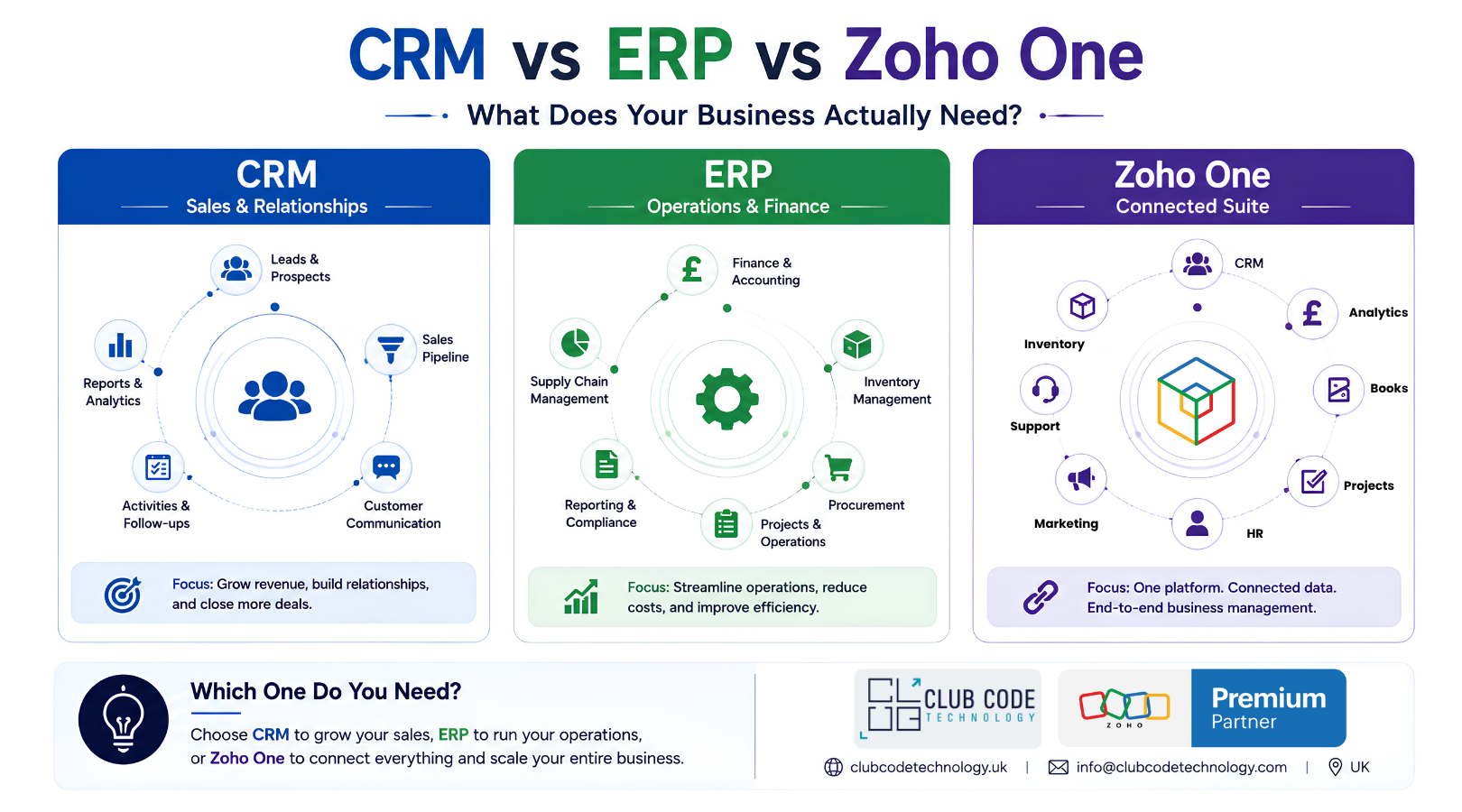
Which one you need depends on where your current pain actually sits — and that’s what this guide works through.
What a CRM actually manages
A CRM system manages everything about how you win and keep customers: contacts, companies, deals, quotes, support tickets, and the communication history behind all of it. Your problem is CRM-shaped if this sounds familiar:
- Sales enquiries are tracked in someone’s inbox or a spreadsheet, and follow-ups get missed
- You can’t see the sales pipeline without asking someone to check
- Customer history is scattered across email threads, so a new team member starts from zero
- Reporting on conversion rates or sales performance means manually pulling numbers together
A CRM solves the relationship and revenue side of the business. It generally doesn’t manage stock levels, run payroll, or handle multi-entity accounting. That’s ERP territory.
What ERP actually coordinates
ERP (Enterprise Resource Planning) software runs the operational and financial engine of the business: the parts that happen after a sale is won, or that happen regardless of sales at all. Purchasing, inventory, production scheduling, accounting, and often HR all sit here. Traditional ERP platforms build around a single shared database, so a stock movement, a purchase order and a financial entry are all the same underlying record, seen differently by different departments.
Your problem is ERP-shaped if:
- Finance, warehouse and operations each keep their own version of the truth, and month-end means reconciling them by hand
- Stock counts on paper or in a spreadsheet don’t match what’s actually on the shelf
- Production or project costing gets worked out manually after the fact, rather than tracked as it happens
- Multiple systems need updating by hand every time something changes
A traditional ERP is usually a bigger, more structured commitment than a CRM — more modules, more configuration, and a bigger change-management job internally, because it touches how operational teams work day to day, not just how sales teams sell.
Where Zoho One fits — and where it doesn’t
This is the part most comparison articles skip, and it’s the one that actually matters for a UK SME weighing up its options.
Zoho One doesn’t work like a single monolithic ERP database in the way a traditional ERP platform does. It’s a connected suite: Zoho CRM, Zoho Books (accounting), Zoho Inventory, Zoho People (HR), Zoho Analytics, Zoho Creator, and dozens more, all licensed together and built to work as one system rather than as separate tools bolted together afterwards. For a large share of UK SMEs, that combination covers the practical territory of both CRM and ERP — sales, finance, stock, HR, reporting — without the cost and timeline of a traditional multi-module ERP implementation.
Where the suite reaches its limits
Businesses with complex manufacturing, multi-entity international finance, or highly regulated production processes often need more than a connected app suite provides out of the box. In those cases, the practical route usually involves a bespoke operational system built on Zoho Creator, Zoho’s low-code development platform, configured specifically around your processes. Don’t expect an off-the-shelf module to match a genuinely complex operation. That’s a custom-build project, not a licence purchase, and it’s worth knowing the difference before you budget for either.
So the honest positioning is: Zoho One is a strong, connected alternative to buying separate CRM and ERP systems for most SMEs, and a strong foundation to build custom operational tooling on top of for businesses with more complex needs. It is not automatically “an ERP” in the traditional sense, and a business with genuinely complex multi-entity manufacturing operations should scope that carefully before assuming Zoho One covers it unmodified.
A practical way to work out where you actually sit
Start from where the pain is today, not from the software category.
If sales and customer relationships cause the entire problem — missed follow-ups, no pipeline visibility, scattered customer history — start with CRM. You don’t need operational modules you’re not using yet.
If operations and finance cause the entire problem — stock discrepancies, manual reconciliation, no real-time costing — and sales tracking already works fine, prioritise the ERP side. That might mean implementing Zoho Books, Inventory and related apps before touching CRM at all.
If the problem spans both — sales data doesn’t talk to stock or finance data, teams re-key the same information into multiple places, month-end means manually stitching together numbers from different systems — that’s the strongest case for a connected suite like Zoho One from the outset. Implementing CRM and ERP separately now just means integrating them later at extra cost.
If your operation has genuinely complex requirements — multi-site production, regulated manufacturing processes, complex multi-currency multi-entity accounting — scope a custom-built solution on Zoho Creator (or a dedicated ERP platform) properly before committing. Don’t assume a standard implementation will stretch to fit.
A short, honest assessment of where the pain actually sits saves more money than any software discount. It’s the difference between one implementation done properly and two implementations followed by an integration project.
Common mistakes UK businesses make at this stage
Buying software before mapping the process. Licensing a CRM or ERP module doesn’t fix a broken process. It usually just digitises it faster. Map how work actually flows through the business first.
Choosing based on what a competitor uses. Another business’s system choice reflects their operations, their data volume and their team structure, not yours.
Assuming “connected suite” means “zero configuration.” Zoho One’s apps work together by design, but every business still needs the CRM, the accounting rules, the approval workflows and the reporting configured to match how it actually operates. Buying the licence is the easy part. The implementation plan determines whether it gets used.
Underestimating change management. ERP-level projects in particular touch how operational teams work every day. A system that’s technically correct but poorly adopted delivers none of the value it was bought for.
Solving for today’s headcount only. A system that fits ten people can become a bottleneck at thirty. Ask, at the point of decision, roughly how much the business expects to grow into the platform over the next two to three years.
Where to go from here
If you recognise your business in the “spans both” or “complex requirements” categories do not start by choosing a product. It’s a short, structured conversation about where your process actually breaks down, so any recommendation reflects your operations rather than a generic feature comparison.
ClubCode Technology is a Zoho Premium Partner working across CRM, ERP-style operational builds and full Zoho implementations for businesses in more than 40 countries. Our role in that conversation is to tell you honestly which category fits, including cases where the answer is “start smaller than you were planning to.”
Book a free systems assessment call and we’ll map your current process gaps before recommending a direction, not the other way round.