
If your business already runs on Zoho, there’s a good chance you’re paying for AI capability you’re not using. Zoho’s AI layer, branded Zia, sits built into Zoho CRM and the wider Zoho One suite. It already does considerably more than most businesses realise: lead scoring, automated record updates, call and email analysis, and generative tools for building workflows and reports from plain-language prompts.
This isn’t a “what is AI” explainer. It’s a practical rundown of what Zia can actually do inside Zoho today, based on Zoho’s own published feature documentation, plus where the real implementation work lies. Switching a feature on and configuring it properly to fit your business are two different projects.
What Zia actually is
Zia is Zoho’s AI assistant, built into Zoho CRM and extending across the Zoho One suite. Zoho positions it as handling routine, repetitive work so teams can focus on relationships and decisions rather than data entry. Based on the current published feature set, that’s a fair description of its scope, spanning generative AI, predictive scoring, automation suggestions, email and call intelligence, and business reporting. Checkout more.
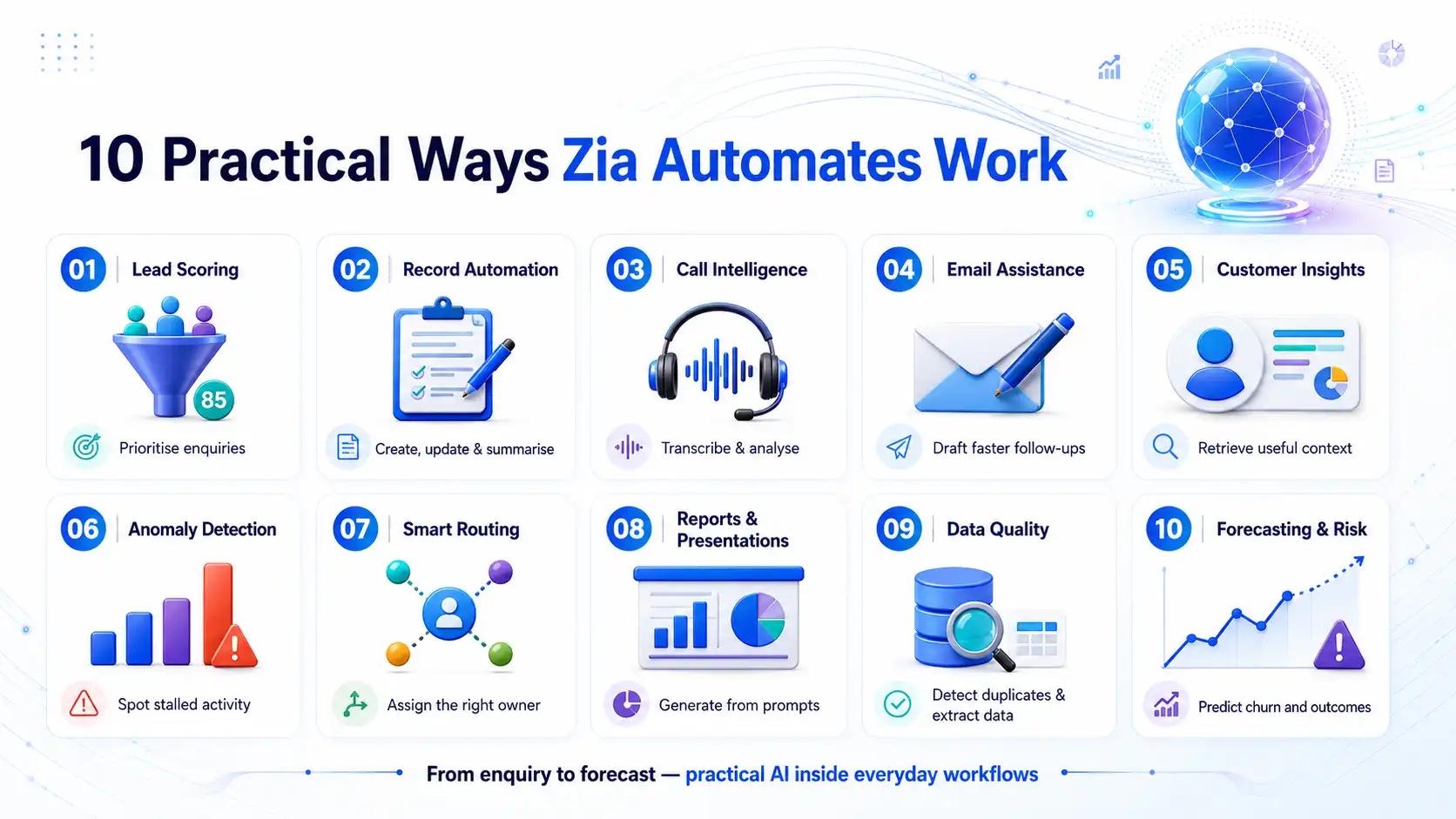
The features below are grouped by practical use case rather than Zoho’s internal feature naming, because that’s how most businesses actually think about what they need automated.
1. Qualifying website and enquiry-form leads
Zia’s scoring capability analyses incoming records and assigns a likelihood score based on patterns from your historical data. Sales teams use this to prioritise which enquiries to call first, rather than working through a list in the order it arrived.
2. Creating and updating CRM records automatically
Zia’s generative tools interpret natural-language instructions to help build modules and workflows. Its record summarisation feature condenses a record’s history into a short overview, useful for anyone picking up a deal or account they haven’t worked before.
3. Summarising sales conversations
Zia’s call intelligence features transcribe call recordings automatically and analyse them for sentiment, intent and a summary of what was discussed. A 20-minute call turns into a few lines a manager or teammate can read in seconds.
4. Preparing follow-up messages
Zia’s writing assistant helps draft and refine emails. Its autocomplete and subject-line suggestion features speed up routine follow-up correspondence, useful for keeping response times down without every message getting written from scratch.
5. Retrieving customer and order information
Zia’s record summarisation and web data enrichment features pull together relevant information about a contact or prospect, including, where enabled, additional publicly available context. A team member no longer has to hunt across multiple records to get up to speed.
6. Identifying overdue activities and unusual patterns
Zia’s anomaly detection flags workflow conflicts and unusual sales patterns automatically. This makes a genuinely useful early-warning feature, catching deals or activities that have quietly stalled before they become a lost-opportunity problem.
7. Routing enquiries and service requests
Zia can recommend record owners based on existing assignment patterns. Properly configured, this reduces the manual admin of deciding who a new lead or ticket should go to, and speeds up first response time.
8. Supporting employees with internal knowledge and reporting
Zia’s generative reporting tools build reports from plain-language prompts, and its “Zia Presentations” feature auto-generates monthly slide decks summarising key metrics. Both reduce the manual reporting work that typically falls on a sales ops or management role.
9. Detecting duplicate records and cleaning data automatically
Zia includes duplicate detection, including image-based matching for certain record types, and Intelligent Character Recognition for extracting data from images into record fields. Both reduce the ongoing data-quality drag that slowly makes any CRM less trustworthy over time.
10. Forecasting and flagging risk before it becomes a problem
Zia’s prediction features include churn-risk scoring, deal win-probability scoring, and AI-assisted forecasting that suggests targets and predicts likely team performance based on historical patterns. Management gets visibility that would otherwise require manual analysis.
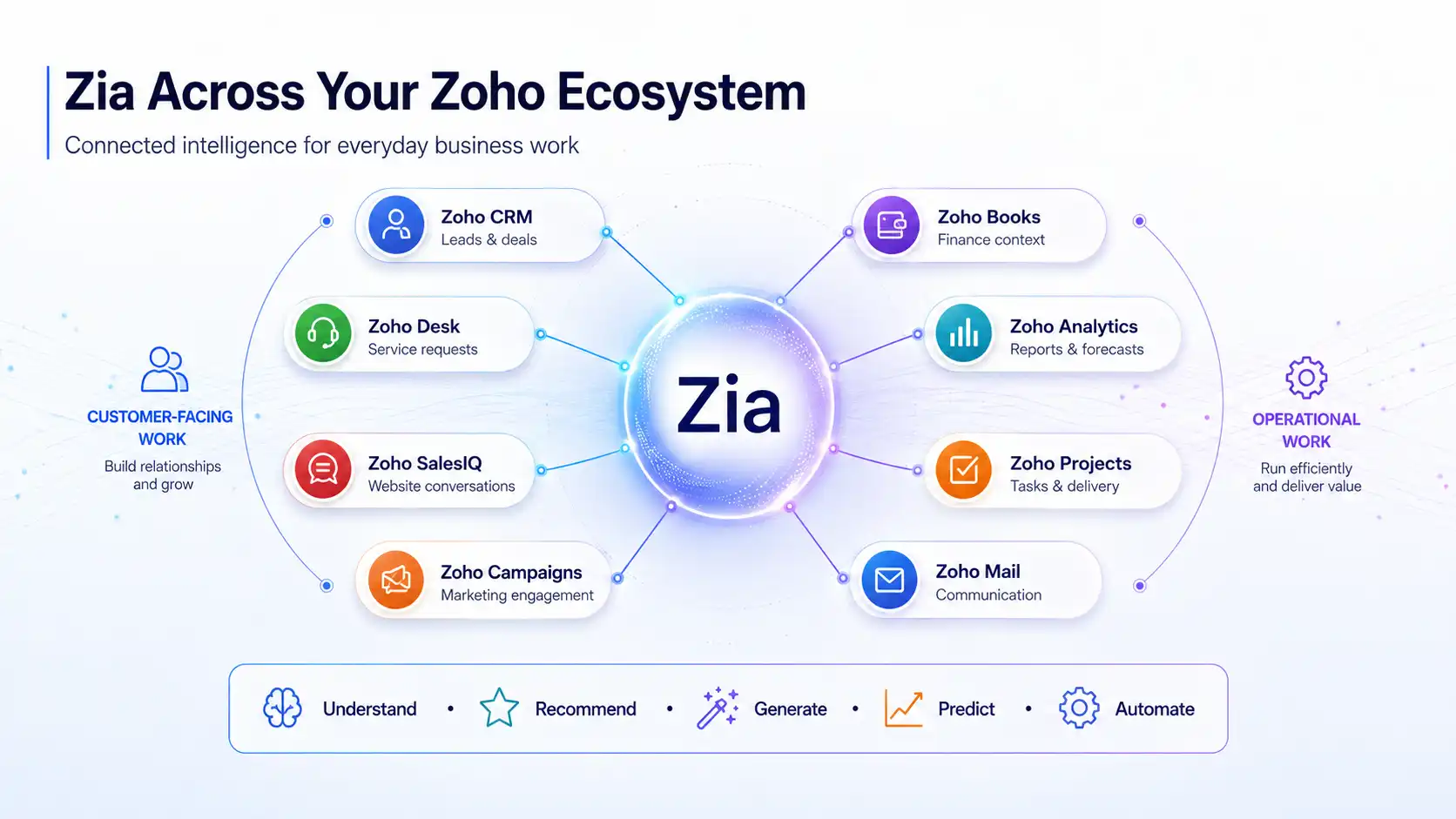
Zia Across your Zoho Ecosystem
Where the real implementation work is
Zia’s feature list runs genuinely long. The ten use cases above only cover the categories most relevant to day-to-day operations, not the full set Zoho publishes. But a long feature list doesn’t equal a working, trusted system, and this is where most businesses either under-use what they’re paying for, or configure it in a way that generates noise rather than value.
Data quality determines everything
Zia’s predictions and scoring only work as well as the historical data they’re trained against. A CRM full of incomplete or inconsistent records produces unreliable scores and recommendations. Fix this first, before switching on predictive features.
Governance needs deciding upfront
Auto-generated emails, auto-assigned records and auto-updated fields all need clear rules about what Zia can do unsupervised versus what needs human review. Switch on generative features without agreeing this internally first, and you end up with automation nobody trusts.
Not every feature suits every business
A ten-person sales team doesn’t need the same Zia configuration as a hundred-person multi-department operation. Implementing every available AI feature at once, rather than the ones that solve a real problem you actually have, tends to create configuration overhead without proportionate value.
Training and adoption still matter
A sales team that doesn’t trust or understand an AI-generated lead score will quietly ignore it. Roll out Zia features without explaining what they do and why the recommendations can be trusted, or where to question them, and you undermine the investment.
Common mistakes when implementing AI in Zoho
Assuming AI features work well immediately, with no configuration. Most of Zia’s predictive and scoring features improve with historical data volume, and need configuring against your specific sales process to become genuinely useful rather than generic.
Turning on generative email drafting without a review step. Left unsupervised, automatically generated customer communication can misrepresent tone, facts or commitments. A human review step for anything customer-facing makes a sensible default until trust in the output is well established.
Treating Zia as a bolt-on rather than part of the implementation plan. AI features configured as an afterthought, disconnected from how the rest of the CRM is set up, tend to underperform compared with AI capability planned in from the start of an implementation, or a proper review of an existing one.
Not measuring whether it’s actually being used. Enabling a feature isn’t the same as adoption. Check usage data after rollout: are reps actually using AI-suggested next actions, is anyone opening the auto-generated reports. That’s the only way to know whether the investment is paying off.
Where to go from here
If you’re already running Zoho and haven’t explored what Zia can do for your specific processes, or you’ve turned features on without a governance plan, that’s a genuinely worthwhile conversation before adding anything else to your system. If you’re evaluating Zoho partly because of its AI capability, scope which specific use cases matter to your business rather than treating “AI features” as a single checkbox.
Book an AI automation readiness consultation and we’ll walk through which Zia capabilities are relevant to your business, what your data readiness actually looks like, and how to roll it out with proper governance rather than switching everything on at once.